As I’ve discussed in previous posts, Flesh and Blood is a game designed to be played…well with real-life flesh and blood opponents. There is nothing like the real-world experience of sitting across the table from a real person and going head to head in battle. However, there are occasions when playing IRL is just not practical. The pandemic has, until recently in the UK, made it very difficult to get together in an enclosed space as a group, and even with fewer restrictions, events in-store do not always accessible to those working evenings and weekends to join in. The obvious solution is to play Flesh and Blood online, and there are several (non-official) options I have found to allow you to do this, the main ones being Felt Table, Discord and Tabletop Simulator (TTS). I don’t have much experience with TTS, so I’m not going to cover that in this post, but I have played the other two platforms and have some thoughts on each.
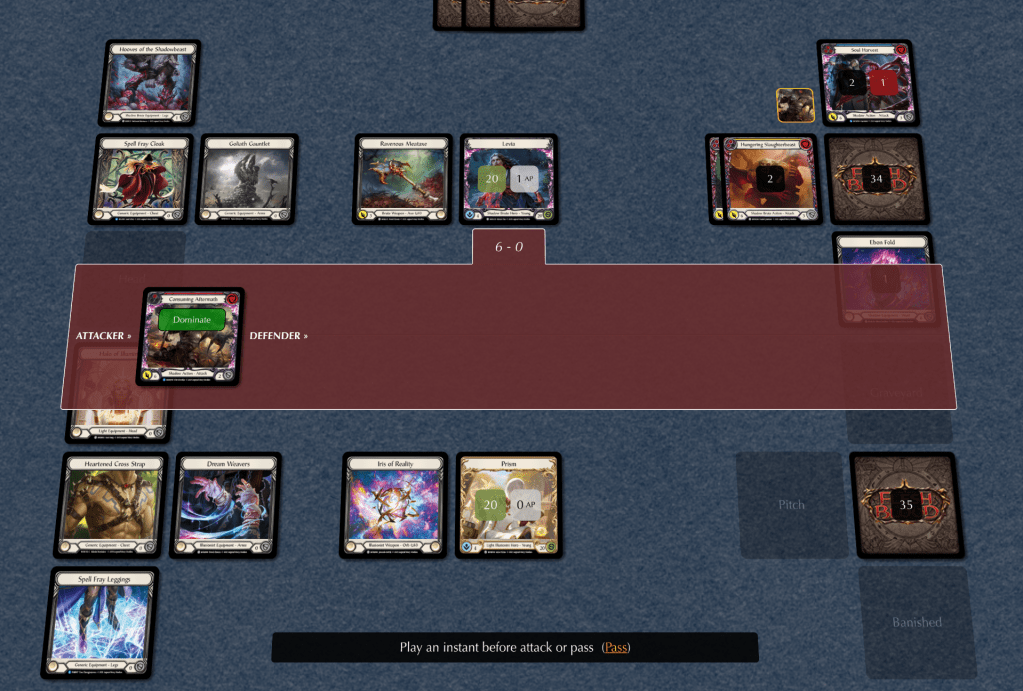
Felt Table was the first online option I used, and I found it extremely useful, especially in the early days of learning the game. One of the main benefits, I found, of Felt Table is that you can play completely independently – you don’t need another player to play against as the platform has a built-in AI. Felt Table does a good job of giving a wide range of heroes and cards to play with and against, although (at the time of writing) not all cards are included in the program. The pre-built decks are based on the standard Blitz and CC decks from LSS, and are a great way to learn the mechanics of the different heroes. As a new player, I was able to try out each hero and find the one that I enjoyed playing the most. Another advantage is that by being able to play most heroes, you can also get a feel for how those characters play, providing insight into their strengths and weakness. This insight can then help inform the development of your own strategies to deploy against those heroes.
After a few weeks of Felt Table (and a few weeks playing in-store), EH Gaming set up their own Discord, which opened up the opportunity of online games with players I knew. The main difference between Discord and Felt Table is that with Discord you are playing against a real player using your own real cards. A webcam and microphone are needed so that you can show your cards to your opponent and have a conversation. The process of setting this up is extremely easy, and as long as your computer is set up correctly, you simply need to join a Discord Voice Channel and switch on video. While I enjoyed playing on Discord, it is certainly not the same as playing in real life, and to my mind, the games don’t flow quite as well as they do in the real world. Having said that, as a way to stay connected to your community and play outside of store hours, it’s a fantastic (and free) solution.
I have heard good things about Tabletop Simulator and will be giving that a try in due course.
 Cracked Bauble